0 ratings

Item #:
73271119
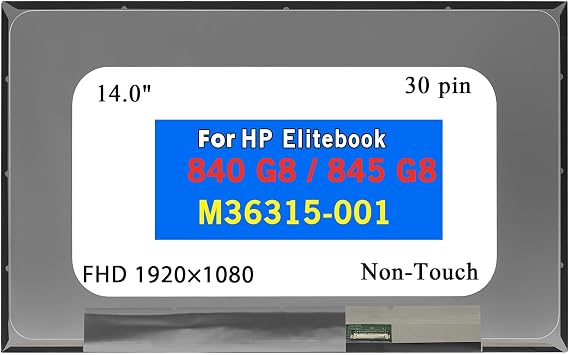
LCD Replacement for HP ELITEBOOK 840 G8 845 G8 M36315-001 N140HCA-E5C E5B N140HCE-ET2 G53 NV140FHM-N4U N4F B140HAN04.D LP140WFA-SPM1 SPMA Non-Touch
Item #:
73271119
BDT 9930
Price Details
Excluding Shipping & Custom charges ( Shipping and custom charges will be calculated on checkout )
*All items will import from US
0 ratings
Write a review
In stock
 Imported from USA store
QTY:
Order now and get it around Friday, July 24
Secured transaction
Ubuy works hard to protect your security and privacy. Our advanced payment security system ensures confidentiality by encrypting your information during transmission using AES (Advanced Encryption Standards) and SSL (Secure Socket Layer) protocols. Your payment details are 100% secure as we do not share your payment details with third party sellers.
Our Top Logistics Partners


We guarantee quality and compatibility for all our computer display screens, ensuring a smooth shopping experience.

Fast
Shipping

Free
Return*

Secure Packaging

100% Original Products

PCI DSS Compliance

ISO 27001 Certified


Note: Step Down Voltage Transformer required for using electronics products of US store (110-120). Recommended power converters Buy Now.


What Stands Out
Sleek Design
This LCD replacement features a slim profile that seamlessly integrates with HP EliteBook models, maintaining the elegant look of your device while ensuring optimal functionality.
High Resolution
Offering Full HD 1080P resolution, this screen replacement delivers crisp, vibrant visuals, enhancing your viewing experience for both professional and personal use compared to lower resolution alternatives.
Easy Installation
Designed for straightforward installation, this non-touch LED panel simplifies DIY repairs, reducing downtime and saving costs for users looking to restore their laptop's display.
Product Details
| Item Weight | 2 lbs (910 grams) |
Who Should Buy?

-
Frequent Travelers
Ideal for users who need a reliable and lightweight replacement screen for their HP EliteBook during travel.
-
Budget-Conscious Users
This affordable LCD option is perfect for users seeking cost-effective replacements without sacrificing quality.
-
DIY Enthusiasts
Great for tech-savvy individuals who enjoy repairing their devices themselves, saving on service costs.

-
Professional Gamers
Gamers seeking high refresh rates and advanced features may find this non-touch screen insufficient for their needs.
-
Graphic Designers
Limited color fidelity and resolution may not meet the demands of professional design work requiring precision.
-
Touch Screen Users
Not suitable for users accustomed to touch functionality, as this is a non-touch replacement screen.
Product Description
LCD Replacement for HP ELITEBOOK 840 G8 845 G8 M36315-001 N140HCA-E5C E5B N140HCE-ET2 G53 NV140FHM-N4U N4F B140HAN04.D LP140WFA-SPM1 SPMA Non-Touch Screen 14.0" 30 Pins FHD 1080P
Have any Query? Chat with us
Customer Questions & Answers
-
Question:
What specifications should I consider when purchasing an LCD replacement for HP ELITEBOOK 840 G8?
Answer: When purchasing an LCD replacement for the HP ELITEBOOK 840 G8, ensure to consider the screen size (14.0 inches), resolution (1920x1080 is commonly preferred), and the compatibility with your specific model number (e.g., M36315-001). It's crucial to match these specifications because a mismatch can lead to installation issues or unsatisfactory performance. Additionally, consider the display type whether it's non-touch, which is simpler to install compared to touch displays, making it ideal for users who primarily use their device for office or browsing tasks. -
Question:
How do I install the LCD replacement for HP ELITEBOOK 840 G8?
Answer: To install your LCD replacement, start by powering down the laptop and removing the battery if possible. Next, carefully unscrew and detach the old screen by following a detailed guide or video tutorial specific to the HP ELITEBOOK 840 G8. Afterward, connect the new LCD screen, ensuring all cables are securely in place. This process requires patience and precision, making it ideal for those who are tech-savvy or willing to learn about laptop repairs. Always ensure you're grounded to prevent static damage during installation. -
Question:
Is there a difference between touch and non-touch LCD screens for my HP ELITEBOOK?
Answer: Yes, there is a significant difference between touch and non-touch LCD screens. Touch screens come with additional digitizer layers, allowing for touch interactions, which can be beneficial for design work or tablet-like functionalities. Non-touch screens, however, are generally less expensive and simpler to install, making them ideal for users who primarily use their laptops for typing and traditional usage scenarios. If you did not originally have a touch screen, sticking with a non-touch replacement can also simplify the repair process. -
Question:
What should I do if my new LCD screen does not display anything?
Answer: If your new LCD screen doesn't display anything after installation, first check that the connector cables are securely attached to both the screen and the motherboard. Next, ensure that your laptop is functioning properly by connecting it to an external monitor. If there is a display on the external monitor, the issue could be with the replacement screen itself. In such cases, referring to troubleshooting guides or contacting technical support for your LCD replacement can help identify if the issue lies in the screen or the installation process. -
Question:
Where can I buy LCD Replacement for HP ELITEBOOK 840 G8?
Answer: You can buy the LCD Replacement for HP ELITEBOOK 840 G8 at Ubuy. They offer a wide range of options specifically suited to your model, ensuring that you find the correct part. Ubuy is well-known for its reliable customer service and extensive inventory that includes various brands and specifications. This makes it a go-to place for customers looking for quality electronic replacements. Always double-check the model compatibility before making a purchase. -
Question:
Why is it important to choose a compatible LCD screen for HP ELITEBOOK 840 G8?
Answer: Choosing a compatible LCD screen for the HP ELITEBOOK 840 G8 ensures that the screen physically fits and functions correctly with your laptop's hardware. An incompatible screen may not connect properly, can cause display issues, and might even damage your laptop. It's essential, therefore, to reference your specific model number and ensure the product specifications match. This is particularly important for those using their laptops for professional work, gaming, or creative projects, where screen quality impacts performance. -
Question:
Can I replace the LCD screen myself, or should I hire a professional?
Answer: Replacing the LCD screen yourself is entirely feasible if you have a moderate level of technical aptitude and follow a step-by-step guide. Many users opt for DIY replacements to save on repair costs and to gain hands-on experience with their device. However, if you feel uncertain or lack the necessary tools, hiring a professional might be the best choice to avoid potential damage or future issues. Taking the time to evaluate your comfort with technical tasks can guide your decision. -
Question:
What are common signs that my HP ELITEBOOK 840 G8 needs an LCD replacement?
Answer: Common signs that your HP ELITEBOOK 840 G8 may need a new LCD include visible cracks, discoloration, flickering images, or dead pixels. If the display is dim or increasingly unresponsive, these are also indicators of potential LCD failure. Users heavily relying on their laptops for work or study should be proactive in addressing these issues, as waiting too long can complicate repairs or lead to further damage. Monitoring screen performance on a regular basis can help detect problems early. -
Question:
What tools will I need for the LCD replacement process?
Answer: You will need a few basic tools for the LCD replacement process, including a small Phillips screwdriver, a plastic prying tool, and an anti-static wrist strap. The screwdriver is necessary for removing screws, and the prying tool helps detach the old screen without causing damage to your laptop's casing. Using an anti-static wrist strap protects the computer's internal components during your work. Preparing these tools in advance will ensure a smoother installation process. -
Question:
How long does it typically take to replace the LCD screen on an HP ELITEBOOK 840 G8?
Answer: The time it takes to replace the LCD screen on an HP ELITEBOOK 840 G8 generally ranges from 30 minutes to 2 hours, depending on your familiarity with laptop repairs. Beginners might take longer as they navigate through the disassembly and reassembly steps. Having a clear guide or video tutorial can significantly reduce the time needed. For those familiar with the process, approximately 30 to 45 minutes is typically sufficient for a complete replacement, making it a manageable task for most users.
btselss Replacement Screens Editorial Review
No editorial reviews found
Customer Reviews & Ratings
1 customers ratings
-
5 Star
100%
-
4 Star
0%
-
3 Star
0%
-
2 Star
0%
-
1 Star
0%
Review this product
Share your thoughts with other customers
Product Price History
Important information
- Limitations : For products shipped internationally, please note that any manufacturer warranty may not be valid; manufacturer service options may not be available; product manuals, instructions, and safety warnings may not be in destination country languages; the products (and accompanying materials) may not be designed in accordance with destination country standards, specifications, and labeling requirements; and the products may not conform to destination country voltage and other electrical standards (requiring use of an adapter or converter if appropriate). The recipient is responsible for assuring that the product can be lawfully imported to the destination country. When ordering from Ubuy or its affiliates, the recipient is the importer of record and must comply with all laws and regulations of the destination country.
- Not all the products listed on Ubuy are for sale, as Ubuy is a global search engine. Products are subject to export/trade regulations.
BDT 9930
Order now and get it around Friday, July 24
This item is not restrict in my country.(Please click on above link if this item is not restrict in your country, So our team will review and allow.)
QTY:
Secured transaction
Ubuy works hard to protect your security and privacy. Our advanced payment security system ensures confidentiality by encrypting your information during transmission using AES (Advanced Encryption Standards) and SSL (Secure Socket Layer) protocols. Your payment details are 100% secure as we do not share your payment details with third party sellers.
Our Top Logistics Partners
Fastest cross-border delivery
Features & Benefits
- Wide variety of computer display screens with guaranteed quality.
- Expert assistance available for model, resolution, and compatibility inquiries.
- Important to confirm model numbers and specifications before purchasing.
- Both touch and non-touch versions available for select models.
- Brackets may or may not be included based on the screen version.
- Contact us for any questions to ensure perfect compatibility.