- Home Page /
- Electronics /
- Computer Accessories /
- Networking Products /
- Wireless Access Points /
- Ubiquiti Networks UniFi Express (UX-US)
0 ratings




Item #:
81454148
Ubiquiti Networks UniFi Express (UX-US)
Item #:
81454148
BDT 35497
Price Details
Excluding Shipping & Custom charges ( Shipping and custom charges will be calculated on checkout )
*All items will import from US
0 ratings
Write a review
In stock
 Imported from USA store
QTY:
Order now and get it around Monday, July 13
Secured transaction
Ubuy works hard to protect your security and privacy. Our advanced payment security system ensures confidentiality by encrypting your information during transmission using AES (Advanced Encryption Standards) and SSL (Secure Socket Layer) protocols. Your payment details are 100% secure as we do not share your payment details with third party sellers.
Our Top Logistics Partners


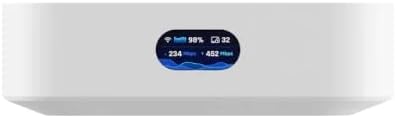
Impressively compact UniFi Cloud Gateway and WiFi 6 access point that runs UniFi Network. Powers an entire network or simply meshes as an access point.

Fast
Shipping

Free
Return*

Secure Packaging

100% Original Products

PCI DSS Compliance

ISO 27001 Certified


Note: Step Down Voltage Transformer required for using electronics products of US store (110-120). Recommended power converters Buy Now.


What Stands Out
Seamless Connectivity
UniFi Express offers seamless, high-speed connectivity across your network, enabling reliable access for all devices without drops or interruptions, improving overall performance for users.
User-Friendly Interface
With an intuitive user interface, UniFi Express makes network management accessible for everyone, allowing even non-experts to easily configure settings and monitor network performance effortlessly.
Scalable Design
Designed for scalability, UniFi Express easily expands your network capabilities as your needs grow, ensuring lasting investment value and adaptability to future requirements.
Product Details
- Impressively compact UniFi Cloud Gateway and WiFi 6 access point that runs UniFi Network. Powers an entire network or simply meshes as an access point.
| Product Dimensions (L x W x H) | 1.2 x 3.9 x 3.9 inches (3 x 9.9 x 9.9 cm) |
| Item Weight | 10.7 ounces (303.35 grams) |
| Item model number | UX |
| Date First Available | February 21, 2024 |
| Manufacturer | Ubiquiti Networks |
What's in the box
Item
Who Should Buy?

-
Small Businesses
Ideal for small businesses seeking reliable network performance with easy management and scalability for growing user demands.
-
Home Users
Perfect for home users wanting to enhance Wi-Fi coverage and connectivity with minimal fuss and hassle-free installation.
-
Tech Enthusiasts
Great for tech enthusiasts who appreciate advanced features, seamless integration, and robust customization options in their network setups.

-
Large Enterprises
Not suitable for large enterprises requiring extensive networking features and extensive support for high-volume connectivity needs.
-
Non-tech Savvy Users
May be overwhelming for users with limited technical knowledge who struggle with configuration and setup complexities.
-
Outdoor Settings
Not ideal for outdoor applications, as the UniFi Express is primarily designed for indoor use and typical home environments.
Product Description
Have any Query? Chat with us
Customer Questions & Answers
-
Question:
What is the Ubiquiti Networks UniFi Express UX-US?
Answer: The Ubiquiti Networks UniFi Express UX-US is a robust Wi-Fi access point designed for seamless network coverage in both home and business environments. It features advanced technology to optimize wireless performance, ensuring stable connections across multiple devices. This device is particularly useful in areas with heavy data demands, making it ideal for streaming, gaming, and remote work setups. -
Question:
How does the UniFi Express UX-US enhance network performance?
Answer: The UniFi Express UX-US enhances network performance through its dual-band technology, which allows for efficient bandwidth distribution. It operates on both the 2.4GHz and 5GHz frequencies, reducing congestion and improving connectivity in high-traffic areas. This feature is especially advantageous in office environments where multiple users are accessing the network simultaneously. -
Question:
Can I manage the Ubiquiti UniFi Express UX-US remotely?
Answer: Yes, the UniFi Express UX-US can be managed remotely using the UniFi Controller software. This empowers users to monitor network performance, adjust settings, and troubleshoot issues from anywhere with internet access. For businesses, this feature facilitates the management of multiple access points, ensuring optimal operation across various locations. -
Question:
What types of environments are best suited for the UniFi Express UX-US?
Answer: The best environments for the UniFi Express UX-US include both residential and small to medium-sized business spaces. Its ability to provide reliable wireless coverage makes it ideal for homes with multiple devices and office setups in need of stable connections. Whether in a conference room or a living room, it aims to eliminate dead zones and improve overall user experience. -
Question:
Is the Ubiquiti UniFi Express UX-US easy to install?
Answer: Yes, the installation of the UniFi Express UX-US is straightforward. Users can follow the step-by-step guide included in the package or utilize online resources to set it up quickly. Additionally, the intuitive UniFi app simplifies the process, allowing for easy configuration without requiring extensive technical knowledge. -
Question:
Does the UniFi Express UX-US support guest networks?
Answer: Absolutely! The UniFi Express UX-US has an option to create guest networks, which is crucial for businesses wanting to provide Wi-Fi access to visitors without compromising the security of their primary network. This feature allows businesses to maintain a professional environment while ensuring guests can connect seamlessly. -
Question:
What security features does the Ubiquiti UniFi Express UX-US provide?
Answer: The UniFi Express UX-US includes robust security features such as WPA3 encryption, which enhances data security over Wi-Fi networks. It also supports VLANs (Virtual Local Area Networks) to segment traffic and ensure stricter access controls. These features are vital for both individual users and businesses looking to protect sensitive information. -
Question:
What makes UniFi Express UX-US different from other access points?
Answer: The UniFi Express UX-US distinguishes itself through its blend of performance, scalability, and user-friendly management. Unlike many basic access points, it integrates seamlessly with the complete UniFi ecosystem, making it easy to scale your network with additional devices. This scalability is perfect for future growth in both home and business networks. -
Question:
Can the Ubiquiti UniFi Express UX-US be used in outdoor settings?
Answer: While the UniFi Express UX-US is primarily designed for indoor use, it can be used effectively in outdoor environments if properly housed in weatherproof enclosures. For outdoor installations, ensure adequate coverage by maintaining proximity to the areas needing connectivity, as this device is optimized for indoor performance. -
Question:
Where can I buy Ubiquiti Networks UniFi Express UX-US in Bangladesh?
Answer: You can buy the Ubiquiti Networks UniFi Express UX-US at Ubuy, where you will find various options and competitive offers tailored to your needs.
Ubiquiti Networks Wireless Access Points UX Editorial Review

No editorial reviews found
Customer Reviews & Ratings
108 customers ratings
-
5 Star
72%
-
4 Star
15%
-
3 Star
6%
-
2 Star
0%
-
1 Star
7%
Review this product
Share your thoughts with other customers
Product Price History
Important information
- Limitations : For products shipped internationally, please note that any manufacturer warranty may not be valid; manufacturer service options may not be available; product manuals, instructions, and safety warnings may not be in destination country languages; the products (and accompanying materials) may not be designed in accordance with destination country standards, specifications, and labeling requirements; and the products may not conform to destination country voltage and other electrical standards (requiring use of an adapter or converter if appropriate). The recipient is responsible for assuring that the product can be lawfully imported to the destination country. When ordering from Ubuy or its affiliates, the recipient is the importer of record and must comply with all laws and regulations of the destination country.
- Not all the products listed on Ubuy are for sale, as Ubuy is a global search engine. Products are subject to export/trade regulations.
BDT 35497
Order now and get it around Monday, July 13
This item is not restrict in my country.(Please click on above link if this item is not restrict in your country, So our team will review and allow.)
QTY:
Secured transaction
Ubuy works hard to protect your security and privacy. Our advanced payment security system ensures confidentiality by encrypting your information during transmission using AES (Advanced Encryption Standards) and SSL (Secure Socket Layer) protocols. Your payment details are 100% secure as we do not share your payment details with third party sellers.
Our Top Logistics Partners
Fastest cross-border delivery
Features & Benefits
- Built-in WiFi 6 AP 140 m² (1,500 ft²) single-unit coverage
- 60+ connected WiFi devices
- (1) GbE RJ45 WAN port
- (1) GbE RJ45 LAN port to extend network
- 0.96 LCM status display
- Manages up to four additional UniFi Network devices when operated as a gateway