- Home Page /
- Electronics /
- Computer Accessories /
- Computer Accessories & Peripherals /
- Keyboards, Mice & Accessories /
- Computer Keyboards /
- Loupedeck More Photo and Video Editing Consol...
0 ratings


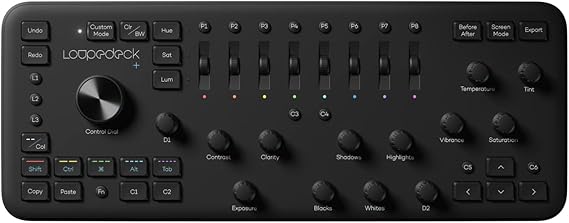
Loupedeck More Photo and Video Editing Console for Adobe Lightroom Classic, Photoshop CC, Camera Raw, Premier Pro CC, After Effects, Audition, Final
0 ratings
Write a review
Out of stock
 Imported from USA store
Secured transaction
Ubuy works hard to protect your security and privacy. Our advanced payment security system ensures confidentiality by encrypting your information during transmission using AES (Advanced Encryption Standards) and SSL (Secure Socket Layer) protocols. Your payment details are 100% secure as we do not share your payment details with third party sellers.
Our Top Logistics Partners


Edit photos and videos easily with real buttons and knobs – intuitive and high-precision.

Fast
Shipping

Free
Return*

Secure Packaging

100% Original Products

PCI DSS Compliance

ISO 27001 Certified


Note: Step Down Voltage Transformer required for using electronics products of US store (110-120). Recommended power converters Buy Now.


What Stands Out
Dedicated Controls
The Loupedeck+ offers customizable knobs and buttons specifically designed for photo and video editing software, enabling quick access to crucial tools, enhancing workflow efficiency for professionals and enthusiasts alike.
Seamless Integration
Fully compatible with popular editing programs like Lightroom, Premiere Pro, and Photoshop, Loupedeck+ allows users to streamline editing tasks, providing a cohesive experience that simplifies complex workflows.
Custom Profiles
Users can create personalized profiles for different software and projects, tailoring the console's functionality to their specific needs, ensuring optimal performance and maximizing creative expression across various editing platforms.
Product Details
- Enjoy native support for Adobe Lightroom Classic, Capture One Pro for MacOS, Photoshop with Camera Raw, Premiere Pro, After Effects, Audition, Final Cut Pro, Illustrator, Ableton Live, Spotify Premium, OBS, Streamlabs for Windows, Twitch, vMix, Philips Hue, and Operating System Control.
- Suitable for both professionals and beginners, offering intuitive buttons, dials, and color wheels to achieve a perfect edit effortlessly.
- Provides an ergonomic editing experience, allowing users to effortlessly edit thousands of photos and video clips while keeping both hands on deck and eyes on their craft.
- Quick and easy setup with factory default profiles for supported creative software, with the option to explore the ever-growing Loupedeck Marketplace for additional plugins, profiles, and Lightroom preset packs.
- Offers customization with up to 4 layers of fully programmable buttons and dials for each editing application, along with the ability to create complex macros, multi-toggle actions, rotary adjustments, and more using Custom Actions and the Loupedeck Software.
- Allows users to build their own Custom Profiles for any creative application, providing ultimate control and personalization.
| Item Weight | 3.4 lbs (1.54 kg) |
Who Should Buy?

-
Professional Editors
Ideal for professional video and photo editors who require efficient workflow and extensive control over their editing tasks.
-
Content Creators
Perfect for YouTubers and vloggers seeking to streamline their editing process across multiple platforms and software quickly.
-
Photographers
Designed for photographers using Lightroom, enhancing their editing speed and allowing for precise adjustments efficiently.

-
Casual Users
Not suitable for casual users who only perform basic edits occasionally and do not require advanced tools.
-
Budget-Conscious
May be too expensive for those on a tight budget who are looking for cost-effective editing solutions.
-
Non-digital Creators
Not appropriate for creators working primarily in non-digital media, such as traditional painters or illustrators.
Product Description
Loupedeck More Photo and Video Editing Console for Adobe Lightroom Classic, Photoshop CC, Camera Raw, Premier Pro CC, After Effects, Audition, Final Cut Pro X and Skylum Aurora HDR
Have any Query? Chat with us
Customer Questions & Answers
-
Question:
What software is compatible with the Loupedeck More Console?
Answer: The Loupedeck More Console is designed to seamlessly integrate with a variety of professional software. It works flawlessly with Adobe Lightroom Classic, Photoshop CC, Camera Raw, Premiere Pro CC, After Effects, and Audition. This compatibility allows users to streamline their workflow across multiple applications, significantly enhancing productivity during photo and video editing. Whether you're adjusting photos in Lightroom or editing videos in Premiere Pro, the console provides tactile control that mimics traditional editing tools, making the experience intuitive and efficient. -
Question:
Can I customize the controls on the Loupedeck More Console?
Answer: Yes, the Loupedeck More Console features fully customizable controls that allow you to set up the interface according to your specific editing needs. You can easily assign different functions to buttons and dials based on your preferred workflow. This level of customization enhances your editing speed, as you can program shortcuts or features you use most frequently. For example, if you often apply certain filters in Photoshop, you can assign that function to a dedicated button for quick access. -
Question:
Is the Loupedeck More Console wireless?
Answer: No, the Loupedeck More Console is not a wireless device; it connects to your computer via USB. This wired connection ensures a reliable and stable performance without latency, which is crucial for professional editing tasks. While some may prefer wireless devices for their portability, the USB connection of Loupedeck ensures that editing sessions run smoothly without interruptions, making it ideal for both studio and home use. -
Question:
What is the learning curve for using the Loupedeck More?
Answer: The learning curve for using the Loupedeck More Console is relatively short, especially for those familiar with Adobe software. Thanks to its intuitive layout and tactile controls, users can quickly adapt to the console. The included guide and online resources help new users get up to speed. For example, photographers and videographers who have used editing software in the past may find that they can switch to using the Loupedeck in just a few editing sessions, benefiting from efficient workflows almost immediately. -
Question:
Can the Loupedeck More Console enhance my photo editing skills?
Answer: Yes, using the Loupedeck More Console can significantly enhance your photo editing skills. The tactile feedback and dedicated controls for various editing features allow for more precise adjustments compared to mouse or keyboard editing. As a result, you can focus on creativity rather than navigating software interfaces. For aspiring photographers, this can translate to improved results and a more enjoyable editing experience, encouraging experimentation with advanced techniques and tools. -
Question:
What makes the Loupedeck More different from the original Loupedeck?
Answer: The Loupedeck More offers enhanced features and a more streamlined design compared to its predecessor. It includes improved knobs, buttons, and advanced customization options that cater to both photo and video editing. Users can enjoy a more ergonomic layout, making longer editing sessions more comfortable. Additionally, the software compatibility has expanded, making it ideal for professionals who work in a multi-software environment. This makes it suitable for both photographers and videographers alike who want to elevate their editing efficiency. -
Question:
Is the Loupedeck More suitable for beginners in photo and video editing?
Answer: Absolutely! The Loupedeck More is suitable for both beginners and professional editors. Its straightforward interface and customizable controls help beginners acclimate to editing software without being overwhelmed. As new users learn to use the software, they can utilize the console to enhance their efficiency and understanding of editing techniques. For example, someone just starting with Adobe Lightroom can adjust exposure or color grading settings easily by using the corresponding knobs and buttons, facilitating a hands-on learning experience. -
Question:
What are some practical use cases for the Loupedeck More Console?
Answer: The Loupedeck More Console can be exceptionally beneficial in various practical scenarios. Photographers can use it for efficient batch editing in Lightroom, while videographers can streamline their editing process in Premiere Pro by using dedicated sliders for color correction or audio tweaks. Additionally, sound editors may find the console handy for controlling audio levels in Audition. This versatility makes it a powerful tool for a range of media professionals, enhancing agility and precision during the editing process across projects. -
Question:
Where can I buy Loupedeck More Photo and Video Editing Console in Bangladesh?
Answer: You can conveniently purchase the Loupedeck More Photo and Video Editing Console through Ubuy. This online platform offers a user-friendly experience where you can easily find the product, explore detailed specifications, and enjoy reliable shipping options within Bangladesh. Ubuy also often provides customer reviews and ratings, helping you make an informed decision before your purchase. -
Question:
How does the Loupedeck More streamline video editing?
Answer: The Loupedeck More streamlines video editing by providing specialized controls that allow quick adjustments specific to video software like Premiere Pro. The dials, buttons, and sliders enable editors to perform tasks such as trimming clips, adjusting audio levels, and color grading with greater efficiency than using a keyboard or mouse. This is especially advantageous during time-sensitive projects, as one can make swift changes with a tactile interface while maintaining focus on the creative aspects of video production.
Loupedeck Keyboards Editorial Review
The Loupedeck More Photo and Video Editing Console has garnered Considerable acclaim from users, particularly those who specialize in photo editing with Adobe Lightroom. Many customers praise its design, which combines functionality with an intuitive layout, allowing quick access to multiple editing controls. The dials, buttons, and sliders are ergonomically designed to enhance the editing experience, making it suitable for both beginners and seasoned professionals. Users appreciate the seamless integration with major editing software such as Adobe Lightroom, Photoshop, and Premiere Pro, claiming it significantly boosts productivity and precision in workflow. The device has a well-received app that enables users to manage settings and customize controls outside the standard presets, adding a layer of personalization that resonates with many. Judging by user experiences, the value for money seems robust; particularly highlighted is its competitive price compared to other advanced models and mechanical keyboards. Its sturdy build quality ensures durability, often described by users as capable of withstanding long hours of rigorous editing. The community surrounding Loupedeck also provides a sense of camaraderie among content creators, with shared tips and supportive customer service further enhancing the overall appeal. A few drawbacks noted include the desire for certain features, such as a better-quality cord—many users wish for a braided option—and some lament the absence of backlit buttons for easier use in low-light conditions. Nevertheless, those who integrate the Loupedeck into their editing workflow often find it transforms their approach to photo and video editing in a meaningful way. **
Customer Reviews & Ratings
1 customers ratings
-
5 Star
100%
-
4 Star
0%
-
3 Star
0%
-
2 Star
0%
-
1 Star
0%
Review this product
Share your thoughts with other customers
Pros
- Intuitive layout and ergonomic design for enhanced user experience
- Seamless integration with major editing software
- High build quality and durability
- Strong community support and resources
- Good value for money relative to similar devices
Cons
- Cord quality could improve; users would prefer a braided cord
Platform Trust & Buyer Confidence

MT
Mohd
Verified buyer
“The product received very good packaging & safe…Thank You”
16 June 2026 · via Trustpilot
SJ
Shawati
Verified buyer
“Accurate delivery timing given”
16 June 2026 · via Trustpilot
YB
Youcef
Verified buyer
“Not madly expensive like I thought, and much quicker than promised.”
15 June 2026 · via Trustpilot
LM
Leila
Verified buyer
“Never dealt with Ubuy before, but everything worked out great. Seamless cross border purchasing and shipping. Thanks!”
6/7/2026 · via Trustpilot
KA
Kwame
Verified buyer
“The process was smooth, with clear communication and timelines. This was my 1st purchase and I am really impressed. I will definitely be coming back.”
12 June 2026 · via Trustpilot
Secure Checkout
Global Delivery
Easy Returns
Genuine Products
People also bought these Items


Product Price History
Important information
- Limitations : For products shipped internationally, please note that any manufacturer warranty may not be valid; manufacturer service options may not be available; product manuals, instructions, and safety warnings may not be in destination country languages; the products (and accompanying materials) may not be designed in accordance with destination country standards, specifications, and labeling requirements; and the products may not conform to destination country voltage and other electrical standards (requiring use of an adapter or converter if appropriate). The recipient is responsible for assuring that the product can be lawfully imported to the destination country. When ordering from Ubuy or its affiliates, the recipient is the importer of record and must comply with all laws and regulations of the destination country.
- Not all the products listed on Ubuy are for sale, as Ubuy is a global search engine. Products are subject to export/trade regulations.
Currently unavailable.
We don't know when or if this item will be back in stock.
This item is not restrict in my country.(Please click on above link if this item is not restrict in your country, So our team will review and allow.)
Secured transaction
PCI DSS compliant and ISO 27001:2022 certified, with encrypted payments and full buyer protection on every order.
Our Top Logistics Partners
Fastest cross-border delivery
Features & Benefits
- Intuitive and high-precision editing with physical buttons and knobs.
- Ergonomic design for seamless editing without screen distractions.
- Ready to use with default features—start editing immediately.
- Customizable controls with up to 4 levels for personalized workflows.
- Expand functionality with Loupedeck Marketplace plugins and presets.
- Compatible with multiple creative applications including Adobe suite and Final Cut Pro.
Ubuy Assurance
Experience worry-free shopping with 100% original products, PCI DSS-compliant payment security, ISO 27001-certified data protection, the fastest cross-border delivery, free returns *, and secure packaging on every order.