- Home Page /
- Electronics /
- Computer Accessories /
- Networking Products /
- Routers /
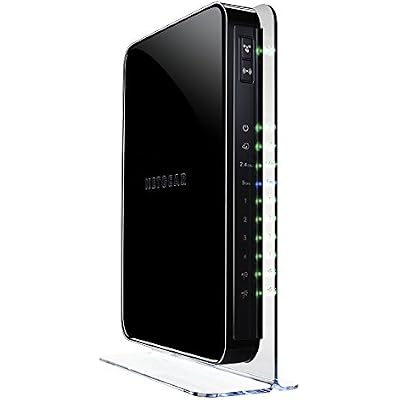
- NETGEAR Wireless Router - N900 Dual Band Giga...
0 ratings


Item #:
1933932
NETGEAR Wireless Router - N900 Dual Band Gigabit WNDR4500v1
Item #:
1933932
BDT 15373
Price Details
Excluding Shipping & Custom charges ( Shipping and custom charges will be calculated on checkout )
*All items will import from US
0 ratings
Write a review
In stock
 Imported from USA store
QTY:
Order now and get it around Friday, July 03
Secured transaction
Ubuy works hard to protect your security and privacy. Our advanced payment security system ensures confidentiality by encrypting your information during transmission using AES (Advanced Encryption Standards) and SSL (Secure Socket Layer) protocols. Your payment details are 100% secure as we do not share your payment details with third party sellers.
Our Top Logistics Partners


NETGEAR N900 Wireless Dual Band Gigabit Router delivers the ultimate performance and range, with a fast, reliable and secure wireless connection to the Internet.

Fast
Shipping

Free
Return*

Secure Packaging

100% Original Products

PCI DSS Compliance

ISO 27001 Certified


Note: Step Down Voltage Transformer required for using electronics products of US store (110-120). Recommended power converters Buy Now.


What Stands Out
Dual Band Technology
Simultaneous dual band provides interference-free connections on both 2.4GHz and 5GHz bands, ensuring efficient streaming and gaming experiences across multiple devices.
Gigabit Ethernet
Four Gigabit Ethernet ports guarantee ultra-fast wired connections for devices requiring high-speed internet, making it ideal for gaming consoles and smart TVs.
Advanced Security
Robust security features like WPA/WPA2 encryption safeguard user data, while guest network access allows for sharing Wi-Fi without compromising the main network.
Product Details
| Item Weight | 1.8 lbs (820 grams) |
Who Should Buy?

-
High-Speed Internet Users
Ideal for users requiring fast internet for streaming, gaming, and large file downloads due to dual-band capabilities.
-
Multiple Device Households
Perfect for homes with multiple devices needing stable connections simultaneously, thanks to advanced Wi-Fi technology.
-
Tech-Savvy Individuals
Great for users who want extensive control over their network settings and enjoy customizing their router features.

-
Budget-Conscious Buyers
May not be suitable for users looking for low-cost solutions, as this router tends to be pricier.
-
Basic Internet Users
Not ideal for users only browsing the web or checking emails, as its advanced features may be unnecessary.
-
Small Apartments
Could be overkill for small living spaces where simpler routers meet everyday internet needs effectively.
Product Description
NETGEAR Wireless Router - N900 Dual Band Gigabit WNDR4500v1
Have any Query? Chat with us
Customer Questions & Answers
-
Question:
What are the key features of the Netgear WiFi Dual Band Gigabit Router WNDR4500-100NAS?
Answer: The Netgear WNDR4500-100NAS boasts impressive features including dual-band support, which allows devices to connect on either the 2.4 GHz or 5 GHz frequency bands, ensuring minimal interference and maximized speed. It supports Gigabit Ethernet ports, enabling fast wired connections for devices that require robust bandwidth, like gaming consoles or streaming devices. Additionally, it offers advanced security protocols to protect your network from unauthorized access, parental controls for managing internet usage, and support for simultaneous connections from multiple devices, making it ideal for households or small offices with heavy internet needs. -
Question:
How does the dual-band functionality work?
Answer: Dual-band functionality allows the WNDR4500-100NAS to transmit data over two different frequency bands: 2.4 GHz and 5 GHz. The 2.4 GHz band is better for longer-range connections and through obstacles but can be slower due to congestion from other devices, while the 5 GHz band offers faster speeds and is less prone to interference. This means that users can connect devices according to their specific needs—streaming HD videos on the 5 GHz band for speed and using the 2.4 GHz band for devices that are farther away or require a stable connection. -
Question:
Can I set up guest Wi-Fi access with this router?
Answer: Yes, the Netgear WNDR4500-100NAS allows you to create a guest Wi-Fi network. This feature is particularly beneficial for sharing internet access with visitors without exposing your private network and its connected devices. Setting up a guest network helps maintain security, as you can configure it with its own password and control access hours, ensuring that guests have a separate, limited access point to your internet connection without compromising your network’s safety. -
Question:
Is the Netgear WNDR4500-100NAS suitable for gamers?
Answer: Absolutely, the Netgear WNDR4500-100NAS is well-suited for gaming due to its dual-band antennas that provide robust wireless coverage and minimized latency. The Gigabit Ethernet ports offer ultra-fast connections, which are ideal for online gaming where lag can impact performance. Additionally, features like Quality of Service (QoS) allow users to prioritize gaming traffic, ensuring a smoother experience during gameplay, even when multiple devices are connected to the network. -
Question:
How can I update the firmware on my Netgear WNDR4500-100NAS?
Answer: Updating the firmware on your WNDR4500-100NAS is essential for improving performance and security. This can be done through the router's web interface. Simply log in to your router's settings using a web browser, navigate to the 'Administration' section, and look for 'Firmware Update'. You can either allow the router to check for updates automatically or manually upload a downloaded firmware file. Keeping your firmware updated helps benefit from new features and optimizes your router's performance. -
Question:
What devices are compatible with the Netgear WNDR4500-100NAS?
Answer: The WNDR4500-100NAS is compatible with a wide range of devices, including laptops, smartphones, tablets, smart TVs, gaming consoles, and more. It adheres to IEEE 802.11 standards, supporting both older and newer devices that connect via Wi-Fi and Ethernet. Moreover, due to its dual-band support, you can connect multiple devices simultaneously without compromising speed, making it ideal for environments where various types of equipment are in use, such as smart home devices alongside gaming gadgets. -
Question:
Can I use my existing router with the WNDR4500-100NAS?
Answer: Yes, you can use the WNDR4500-100NAS in conjunction with your existing router by configuring it as an access point or a secondary router. For this setup, connect the WAN port of the WNDR4500-100NAS to one of the LAN ports on your current router. This configuration allows you to take advantage of the advanced features and dual-band capabilities of the WNDR4500-100NAS while maintaining your existing network setup. This is particularly useful in larger homes where extending Wi-Fi coverage is necessary. -
Question:
What security features does the Netgear WNDR4500-100NAS offer?
Answer: The WNDR4500-100NAS comes equipped with advanced security features such as WPA/WPA2 encryption, ensuring that your network is protected from unauthorized access. It also includes a firewall to block suspicious traffic and provides settings for MAC address filtering, allowing you to specifically deny or permit device access. Additionally, parental controls can help manage internet usage for children, making it a comprehensive router for both security and supervision, ideal for family environments. -
Question:
How can I optimize the Wi-Fi signal of my Netgear WNDR4500-100NAS?
Answer: To optimize your Wi-Fi signal, place the WNDR4500-100NAS in a central location away from walls and obstructions to enhance coverage. You can also adjust the antennas for better reception in specific directions and ensure the router firmware is up to date. Utilizing the QoS settings can also help manage bandwidth distribution among connected devices, prioritizing critical services. These practices are especially useful in larger homes or settings where multiple devices access the network regularly. -
Question:
Where can I buy the Netgear WiFi Dual Band Gigabit Router WNDR4500-100NAS?
Answer: You can buy the Netgear WiFi Dual Band Gigabit Router WNDR4500-100NAS from Ubuy in Bangladesh. Ubuy offers a reliable shopping platform with a variety of electronics, including Netgear products, ensuring you can find the right router for your internet needs.
NETGEAR Routers Editorial Review
The Netgear WiFi Dual Band Gigabit Router WNDR4500-100NAS is a highly recommended router for users who are looking for fast and reliable internet connectivity. With its dual band technology, it offers both 2.4GHz and 5GHz frequencies, allowing for faster and more stable connections. The router is also compatible with Comcast XFINITY Extreme 50 internet and Digital TV. Customers have praised the performance of this router, noting that it has significantly improved their internet speeds. Users have reported download speeds of up to 57-58 Mbps and upload speeds of 12-13 Mbps. The router is also easy to set up and has a user-friendly interface. The smart phone connection is also fast, with one user reporting faster download speeds on their phone compared to a direct line connection to their desktop. While the router can be used as both a router and a modem, some users recommend using their ISP's provided modem for better support and troubleshooting. Those who have used the Netgear WNDR4500 router in combination with their ISP's modem have been satisfied with the performance of both devices. In terms of streaming video, users have not reported any issues when streaming from YouTube. However, there is no specific information provided regarding compatibility with Roku. Users should note that the Netgear WNDR4500 router does not have a built-in BitTorrent client. Therefore, users would need an active PC client with a running torrent client to download torrents directly to the HDD connected to one of the router's USB ports. Overall, the Netgear WiFi Dual Band Gigabit Router WNDR4500-100NAS is highly regarded for its speed, ease of use, and overall performance. It is a reliable router for home networks.
Customer Reviews & Ratings
1 customers ratings
-
5 Star
100%
-
4 Star
0%
-
3 Star
0%
-
2 Star
0%
-
1 Star
0%
Review this product
Share your thoughts with other customers
Pros
- Fast and reliable internet connectivity
- Dual band technology for faster and more stable connections
- Compatible with Comcast XFINITY Extreme 50 internet and Digital TV
- Easy to set up
- User-friendly interface
Cons
- No built-in BitTorrent client
Product Price History
Important information
- Limitations : For products shipped internationally, please note that any manufacturer warranty may not be valid; manufacturer service options may not be available; product manuals, instructions, and safety warnings may not be in destination country languages; the products (and accompanying materials) may not be designed in accordance with destination country standards, specifications, and labeling requirements; and the products may not conform to destination country voltage and other electrical standards (requiring use of an adapter or converter if appropriate). The recipient is responsible for assuring that the product can be lawfully imported to the destination country. When ordering from Ubuy or its affiliates, the recipient is the importer of record and must comply with all laws and regulations of the destination country.
- Not all the products listed on Ubuy are for sale, as Ubuy is a global search engine. Products are subject to export/trade regulations.
BDT 15373
Order now and get it around Friday, July 03
This item is not restrict in my country.(Please click on above link if this item is not restrict in your country, So our team will review and allow.)
QTY:
Secured transaction
Ubuy works hard to protect your security and privacy. Our advanced payment security system ensures confidentiality by encrypting your information during transmission using AES (Advanced Encryption Standards) and SSL (Secure Socket Layer) protocols. Your payment details are 100% secure as we do not share your payment details with third party sellers.
Our Top Logistics Partners
Fastest cross-border delivery
Features & Benefits
- Wireless N900 Dual Band Gigabit Router with WiFi Speeds up to 900 Mbps
- ideal for HD video streaming and other demanding applications
- Best-in-class security (WPA/WPA2-PSK) and Push ?N? Connect ensures a quick and secure network connection using WiFi Protected Setup? (WPS)
- Easy dashboard control to manage, monitor and repair your home network.
- Simultaneous Dual Band doubles bandwidth while reducing WiFi interference
- Ideal for larger homes with many connected devices